For iPhone
Build the habit of being active.
Being more active isn't a motivation problem — the time is never actually there. I get movin finds the free, good-weather gaps in your week and books them, so by the time the day arrives the decision is already made.
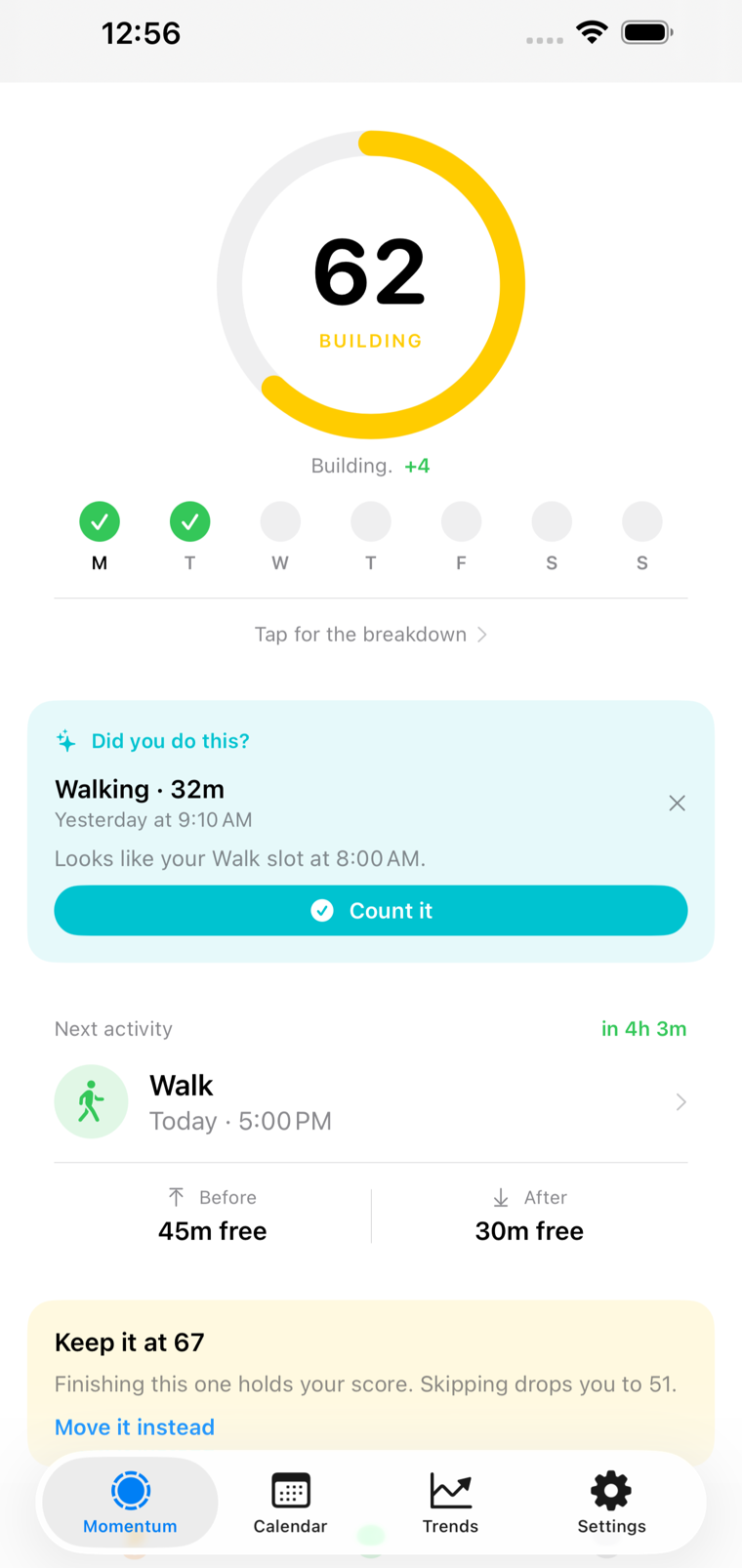
Motivation runs out. A booked slot doesn't.
Every healthy habit dies in the same place: the moment you have to decide, again, when to fit it in. I get movin removes that moment. The time is chosen in advance, on your calendar, in weather you'll actually go out in — so turning up is the easy option instead of the disciplined one.
How it works
Three steps, then it runs itself
Setup takes about a minute. After that the habit is maintained for you.
-
Say what you want to build
Pick the activity, the days, and a rough time window. That's the whole setup. Connect Google Calendar if you want it to work around your meetings — it's optional.
-
It picks the moment
Every candidate hour is scored on temperature, rain, wind, UV and daylight, then weighed against what else is on. The best one gets booked.
-
You just turn up
Record it however you already do and Apple Health ticks the session off. Miss one and it finds you another slot rather than letting the week slide.
Your week
The habit has a place in the day
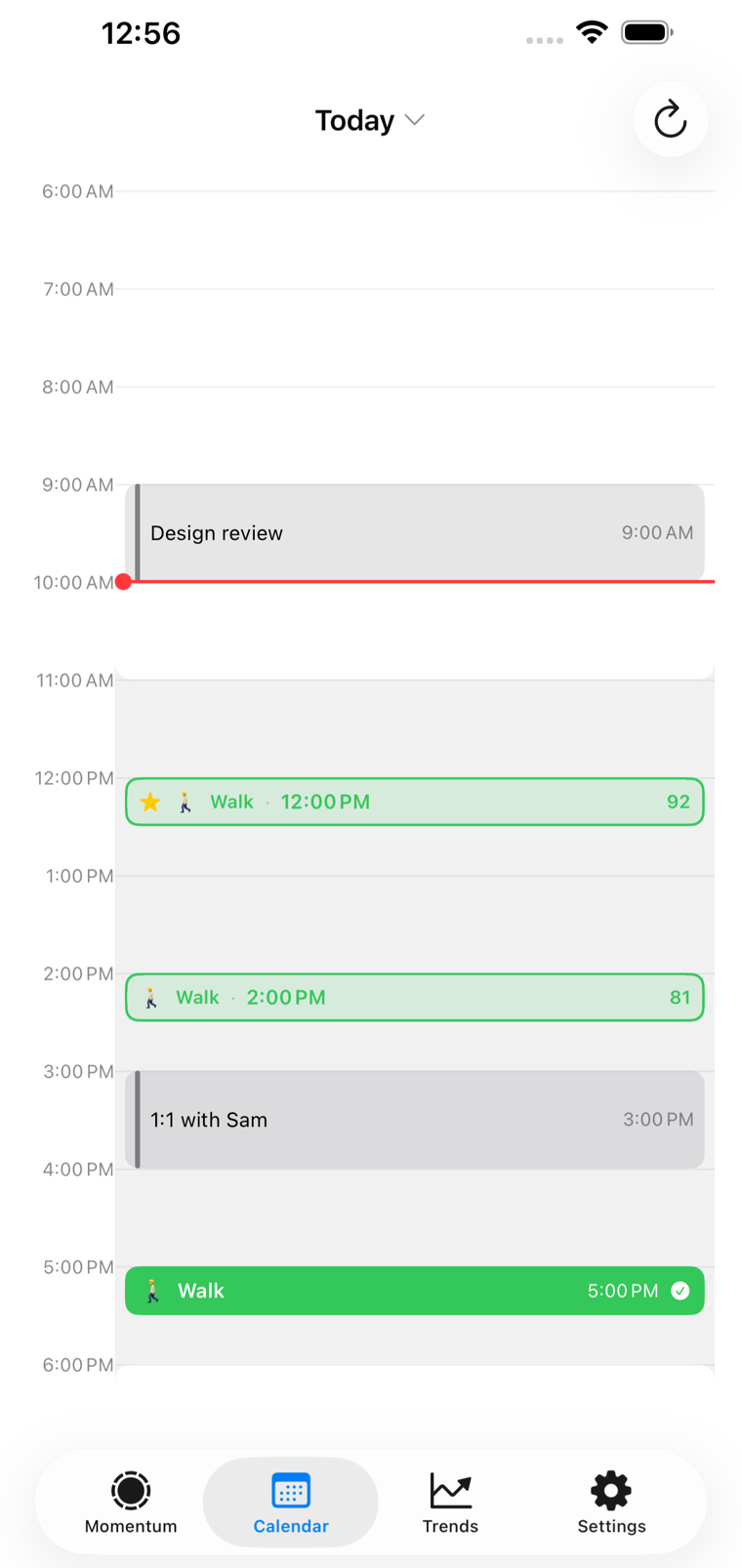
Activities aren't a to-do item you'll get to. They sit on the timeline between the design review and the 1:1, in a slot that was chosen because it was genuinely free.
- Booked slots show alongside your real meetings
- Candidate times carry the score they were picked on
- Move a slot in Google Calendar; the rest of the plan adjusts
Good weather, not just a gap
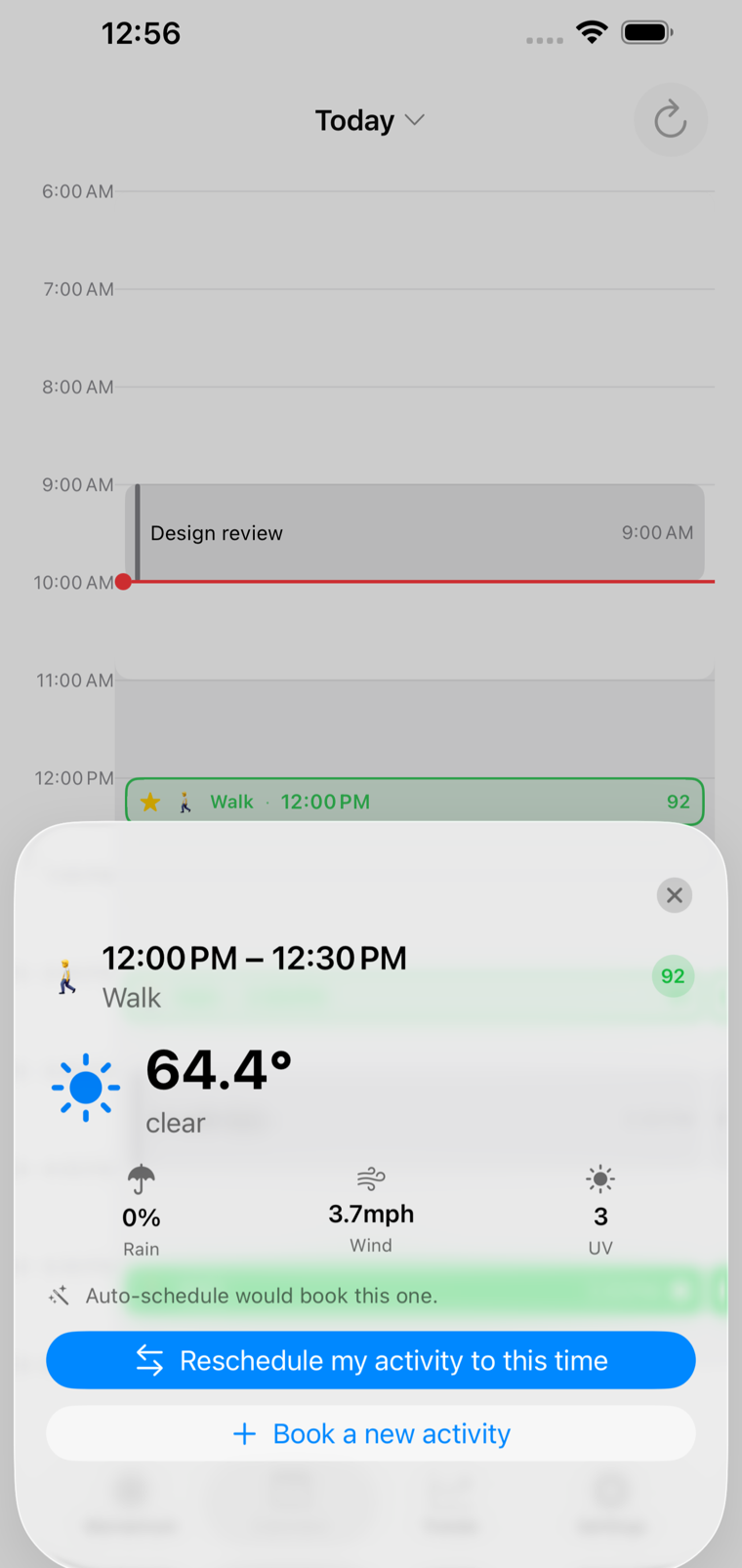
Chosen in weather you'll actually go out in
A free hour in cold rain is not a free hour. Every slot is scored on the five things that decide whether you'll really step outside, and you can see the reasoning behind the one it picked.
- Temperature, rain, wind, UV and daylight
- Cooler mornings in summer, warmer afternoons in winter
- Every score is shown, never hidden behind a guess
Proof it's working
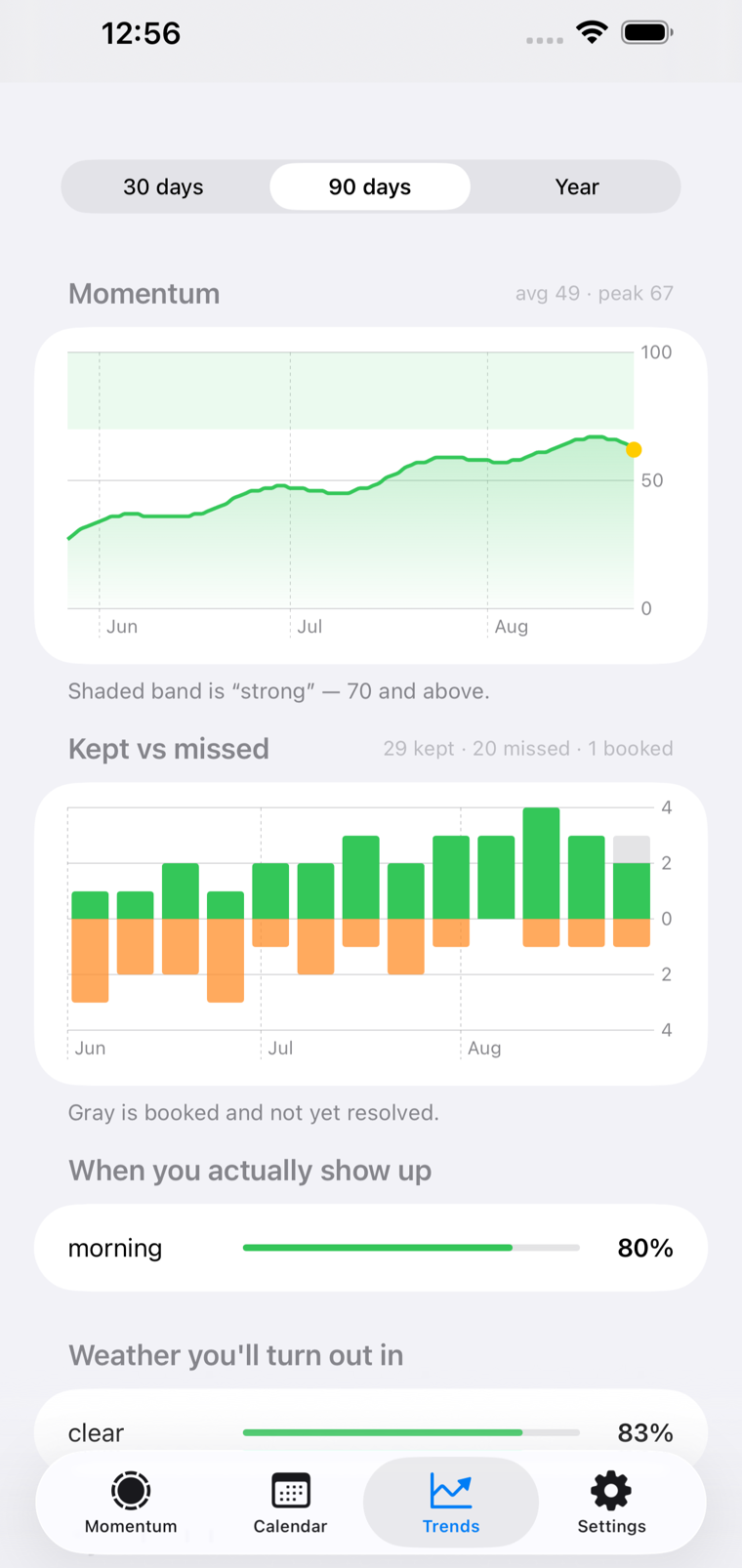
Watch the habit take hold
Long before the results show up in the mirror, they show up here. Momentum over 90 days, kept against missed, the times of day you genuinely turn up, and the weather you'll go out in.
- Momentum over 30 days, 90 days or a year
- Kept above the line, missed below it — a bad week is a shape
- When you actually show up, so your plan can match reality
Features
Everything that keeps the habit going
The parts that matter are the ones that work when you've stopped paying attention.
Weather-aware timing
Each hour is scored on temperature, rain, wind, UV and daylight — cooler mornings in summer, warmer afternoons in winter, rain avoided.
Fits the week you already have
Connect Google Calendar and it uses your availability to book around your meetings, adding each activity as an event.
Reschedules itself
When a meeting lands on top of your walk, or a slot falls through, it quietly finds the next best time instead of letting the week slide.
Apple Health, hands-off
Walks and runs you already record on an Apple Watch or your iPhone tick your sessions off automatically. It only ever reads — never writes.
A momentum score
One number, 0 to 100, for how consistently you're turning up. It names the cost before you pay it, and always names the way back.
Not only walking
Start with walks and runs, then add anything else you want to make room for — a swim, a stretch, twenty pages of a book.
Pricing
One plan. The whole habit system.
Using I get movin requires an active Pro subscription.
I get movin Pro
RequiredEverything the app does, in one subscription.
- Automatic scheduling — slots are booked for you
- Automatic rescheduling when one falls through
- Manual booking, with or without Google Calendar
- Weather scoring, Apple Health matching, Momentum, and Trends
Monthly or yearly, auto-renewing. Cancel any time in Settings › Apple Account › Subscriptions. See the Terms of Use.
Privacy
Your calendar and health data stay yours
The app needs a little context to pick a good time. It asks for as little as it can, and gives nothing away.
Apple Health is read-only
I get movin reads the workouts you already record so it can tick sessions off. It never writes anything back to Apple Health.
Your calendar isn't shared
Google Calendar is optional. When it's on, the app reads when you're free or busy and adds your activities. It never shares or posts your events.
No selling, and you can leave
Your data isn't sold. You can delete your account, and everything with it, from Settings inside the app. The privacy policy spells it out.
Frequently asked questions
What does I get movin actually do?
You say what you want to do, which days, and roughly when. It scores the hours in your week on weather, daylight and how well they fit around everything else, books the best one, and reschedules it if the slot falls through. By the time the day arrives, the decision has already been made for you.
Do I have to connect a calendar?
No. Google Calendar is entirely optional. Connect it and activities are booked around your meetings and added as events; leave it switched off and scoring, booking, rescheduling and trends all work exactly the same. It uses your calendar to understand your day, and it never shares or posts your events.
How does it know I actually went?
If you already record walks and runs on an Apple Watch or your iPhone, I get movin reads those workouts from Apple Health and ticks the matching session off by itself. It never writes anything to Apple Health. You can also just check a session off by hand.
Is it only for walking and running?
No. Walks and runs are the starting point, but you can schedule anything you want to make room for — a swim, a stretch, twenty pages of a book. Recorded walks and runs can complete themselves through Apple Health; anything else you check off by hand.
What happens when I miss one?
It finds you the next best slot instead of letting the week slide, and it tells you the cost before you pay it rather than scolding you afterwards. A missed session lowers your momentum score, and the app always names the way back.
What is the momentum score?
A single number from 0 to 100 that reflects how consistently you are turning up — flying, building, slipping or stalled. It is there so the habit is visible while it is still forming, before the results are.
Does it require a subscription?
Yes. Using I get movin requires an active Pro subscription. Pro includes automatic scheduling and rescheduling, manual booking, optional Google Calendar integration, Apple Health activity matching, Momentum, and Trends. It is available monthly or yearly, and you can cancel any time in Settings on your iPhone.
Which devices does it work on?
iPhone, on iOS 17 or later. There is no Android or iPad version yet. Workouts recorded on an Apple Watch are picked up through Apple Health on your iPhone.
Your next walk is already scheduled.
Stop deciding when to be active. Let it be decided for you.